A serverless application to prevent invoice fraud by verifying the authenticity of invoices using AWS services.



Overview
TrustBill is a serverless application that helps organizations prevent invoice fraud by automatically verifying invoices against trusted vendor information. It extracts data from invoices using Amazon Bedrock AI, compares it against known vendor records, and flags potentially fraudulent invoices based on several risk factors.
Key Features
- Invoice Data Extraction: Uses Amazon Bedrock to extract key data points from invoice PDFs
- Fraud Detection: Detects multiple fraud indicators including:
- Incorrect vendor banking details
- Duplicate invoices
- Unusual amounts
- Missing itemization
- DynamoDB Storage: Stores vendor information and invoice history for rapid lookups
- API Gateway Integration: Provides webhook endpoints for receiving invoices
- EventBridge Driven: Uses event-driven architecture for processing
Architecture
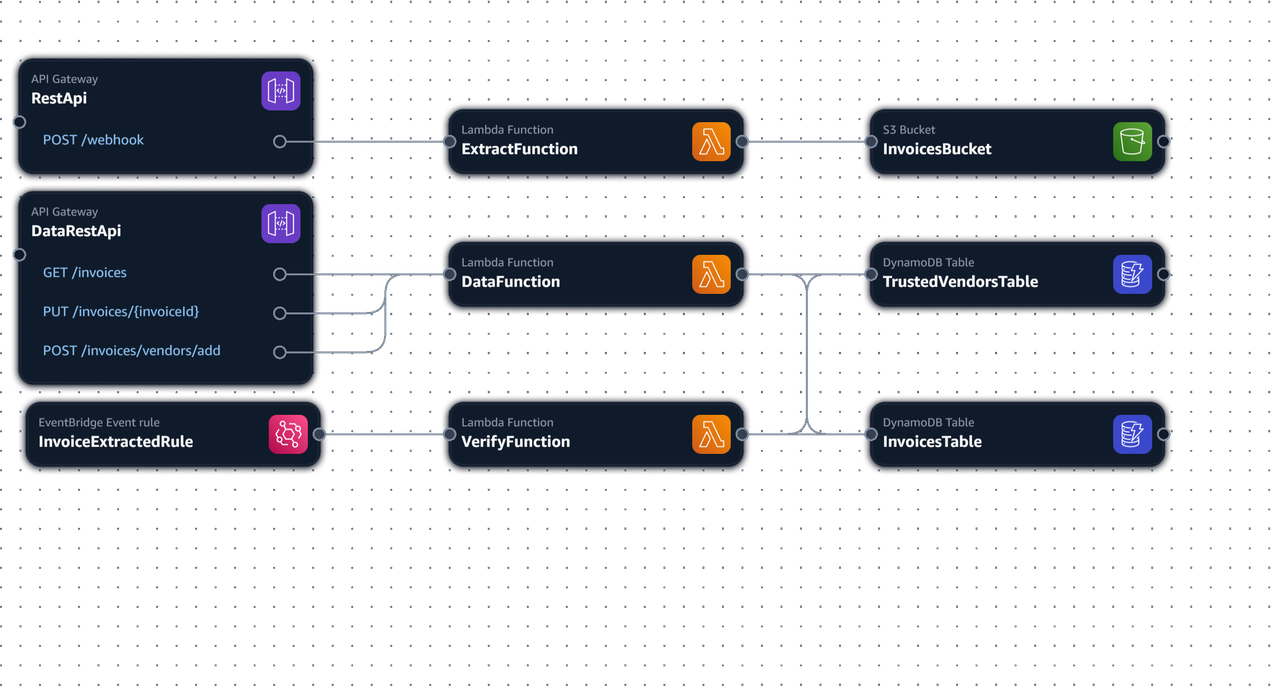
The application consists of three main Lambda functions:
- Extract Function: Receives invoice PDFs through API Gateway, extracts data using Amazon Bedrock AI, and publishes an event to EventBridge
- Verify Function: Triggered by EventBridge events to verify invoice authenticity against vendor records
- Data Function: Provides API endpoints for querying invoice data and managing flagged invoices
Installation
Prerequisites
- AWS CLI configured with appropriate permissions
- AWS SAM CLI
- Python 3.13+
Setup
-
Clone the repository:
git clone https://github.com/yourusername/trustbill.git cd trustbill -
Create a virtual environment and install dependencies:
python -m venv env source env/bin/activate # On Windows: env\Scripts\activate pip install -r requirements.txt -
Deploy the application:
sam build
sam deploy --guided
Usage
Submitting Invoices
Send a POST request to the webhook endpoint with the invoice PDF:
curl -X POST https://your-api-gateway-url/webhook \
  -H "Content-Type: application/json" \
  -d '{
    "TextBody": "From: vendor@example.com\nSubject: Invoice for May",
    "Attachments": [{
      "Content": "base64_encoded_pdf_content",
      "ContentType": "application/pdf",
      "Name": "invoice.pdf"
    }]
  }'
Querying Invoice Data
Get all invoices and vendors:
curl -X GET https://your-data-api-url/invoicesUnflagging an Invoice
To remove flags from an invoice after review:
curl -X PUT https://your-data-api-url/invoices/{invoiceId}Adding a Trusted Vendor
curl -X POST https://your-data-api-url/invoices/vendors/add \
  -H "Content-Type: application/json" \
  -d '{
    "vendorId": "unique-vendor-id",
    "VendorEmail": "vendor@example.com",
    "VendorName": "Trusted Vendor Inc.",
    "VendorBankName": "Example Bank",
    "VendorBankAccount": "123456789",
    "VendorIFSCCode": "EXBK00001",
    "VendorBankRoutingNumber": "987654321"
  }'
Testing
Run all tests:
python -m pytestRun tests with coverage:
python -m pytest --cov=trustbill --cov-report=term --cov-report=htmlTo run specific test suites:
python -m pytest tests/unit/test_data.py
python -m pytest tests/unit/test_verify.py
python -m pytest tests/unit/test_extract.py
Project Structure
TrustBill/
├── Makefile               # Helper commands
├── template.yaml          # AWS SAM template
├── requirements.txt       # Production dependencies
├── requirements-dev.txt   # Development dependencies
├── tests/                 # Test suite
│   ├── unit/              # Unit tests
│   └── test_template.py   # Infrastructure tests
└── trustbill/             # Application source code
    ├── data/              # Data API functions
    ├── extract/           # Invoice extraction functions
    └── verify/            # Invoice verification functions
DynamoDB Schema
TrustedVendors Table
- Primary Key:
vendorId(String) - GSI:
VendorEmailIndexonVendorEmail(String)
Invoices Table
- Primary Key:
invoiceId(String) - GSI:
VendorEmailIndexonVendorEmail(String)
License
This project is licensed under the MIT License - see the LICENSE file for details.